 wh1le
wh1le



You configure your API to allow 10 requests per second. A pentester decides to audit your endpoints. They fire off 20 requests in a single second - and every single one gets through. Your logs confirm it. No errors, no 429 Too Many Requests.
If you are using a standard rate limiting library like rack-attack, you haven’t been hacked. You’ve just fallen victim to the Fixed Window Boundary Problem.
When scaling Ruby applications, off-the-shelf tools get you 90% of the way there. But when you need absolute precision - like strictly enforcing API billing quotas, protecting expensive LLM calls, or stopping brute-force credential stuffing - the default algorithms break down.
Here is exactly why the boundary burst happens, and how to architect a mathematically precise solution using Redis and Lua.
The Fixed Window Trap
Most default rate limiters (including rack-attack) use a “Fixed Window” algorithm. To keep the memory footprint and CPU usage as close to zero as possible, they divide time into rigid, static buckets.
If your limit is 10 requests per second, the system generates a cache key using the floored epoch timestamp. It looks something like this: rack::attack:1620000059:192.168.1.1.
Because it rounds down to the nearest second, it creates a massive blind spot exactly at the boundary between two time windows:
- 12:00:59.990: The attacker sends 10 requests. The counter for epoch
1620000059hits 10. The requests are allowed. - 12:01:00.010: Twenty milliseconds later, the epoch ticks over to
1620000060. A brand new, empty counter begins. The attacker sends another 10 requests. They are also allowed.
The attacker just pushed 20 requests in ~0.02 seconds right through a system configured to strictly allow 10.
The Solution: Sliding Window Log
To fix this, we have to stop grouping requests into rigid buckets. Instead, we need a Sliding Window Log.
This algorithm tracks the exact timestamp of every individual request. When a new request arrives, it looks back exactly one window (e.g., 60 seconds ago from right now), drops the expired requests, and counts what is left.
Doing this directly in Ruby introduces race conditions. Let’s look at why a naive approach fails at scale.
The In-Memory Attempt
Your first instinct might be to keep it simple - an in-memory hash, no Redis required:
class SlidingWindowNonAtomic
  def initialize(max_requests: 10, window_seconds: 60)
    @max_requests = max_requests
    @window_seconds = window_seconds
    # Group requests by client_id
    @requests = Hash.new { |h, k| h[k] = [] }
  end

  def allow?(client_id)
    now = Time.now.to_f

    # 1. Prune expired timestamps
    @requests[client_id].reject! { |t| t < now - @window_seconds }

    # 2. Evaluate and insert
    if @requests[client_id].size < @max_requests
      @requests[client_id] << now
      true
    else
      false
    end
  end
end
This breaks in three critical ways:
- Not thread-safe: Mutating a shared Hash/Array without a Mutex will cause data corruption when concurrent threads evaluate the same client simultaneously.
- Not shared across workers: Each Puma process (or Sidekiq worker) maintains its own isolated
@requestshash in memory. The limit is multiplied by your worker count. - Severe memory leaks: If a client makes one request and never returns, their array stays in the Hash forever. Under heavy public traffic, this will eventually exhaust your server’s RAM.
So, you reach for Redis. Before we write the code, let’s establish the data structure.
Redis Sorted Sets: The Right Tool
A Redis Sorted Set (ZSET) stores unique members, each with a numeric score. Think of it as a hash map that stays sorted by value. For rate limiting, we store each request as a member and use its timestamp as the score. This gives us efficient time-range operations for free.
Here are the commands we’ll use:
ZREMRANGEBYSCORE key min max- Removes all members with a score betweenminandmax. We use this to prune requests older than our window (-inftonow - window_seconds).ZCARD key- Returns the number of members in the set.O(1)time complexity - it’s a stored counter, not a scan.ZADD key score member- Adds a member with the given score. We insert the current timestamp as both the score and part of a unique string.EXPIRE key seconds- Sets a TTL on the entire key. This is our safety net against memory leaks. We set it towindow + 1second so inactive keys automatically self-destruct.
The Redis Approach (Still Broken)
Your next instinct might be to translate this directly into standard Redis commands:
lib/ruby_at_scale/rate_limiter/sliding_window_non_atomic.rb
# frozen_string_literal: true
require 'redis'

module RubyAtScale
  module RateLimiter
    class SlidingWindowNonAtomic
      KEY_PREFIX = 'rate_limit'

      def initialize(redis: Redis.new, max_requests: 10, window_seconds: 60)
        @redis = redis
        @max_requests = max_requests
        @window_seconds = window_seconds
      end

      def allow?(client_id)
        now = Time.now.to_f
        key = "#{KEY_PREFIX}:#{client_id}"

        @redis.zremrangebyscore(key, '-inf', now - @window_seconds)
        count = @redis.zcard(key)

        if count < @max_requests
          @redis.zadd(key, now, "#{now}:#{rand}")
          @redis.expire(key, @window_seconds.ceil + 1)
          true
        else
          false
        end
      end
    end
  end
end
This uses the exact correct algorithm. The logic is identical to our final solution. So what’s wrong with it?
The gap between ZCARD and ZADD is not atomic.
Each Redis command is a separate network round-trip. Between the moment your code reads count = 9 and the moment it writes the 10th entry, another thread on another Puma worker can also read count = 9, decide the request is allowed, and write to the database. Both requests get through. The limit is violated.
Proving It Breaks
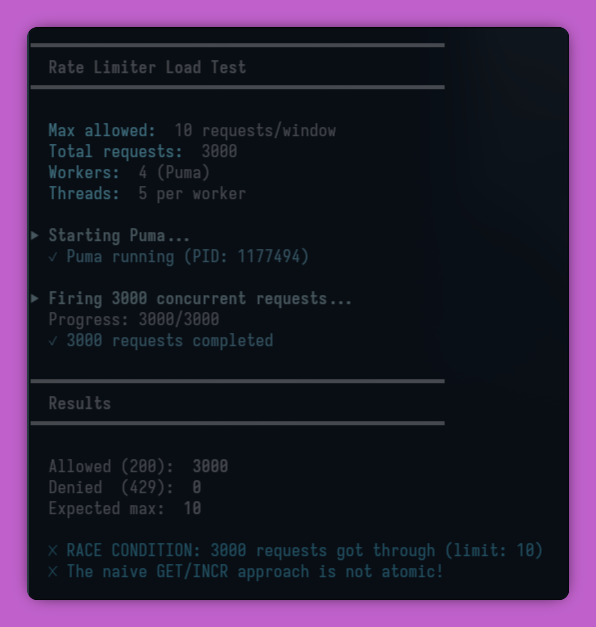
Here is a load test firing 3,000 concurrent requests through 4 Puma workers (5 threads each) against a limit of 10:
spec/system/bin/rate_limiter_test
━━━━━━━━━━━━━━━━━━━━━━━━━━━━━━━━━━━━━━━━━━━━━━
  Rate Limiter Load Test
━━━━━━━━━━━━━━━━━━━━━━━━━━━━━━━━━━━━━━━━━━━━━━
  Max allowed:  10 requests/window
  Total requests:  3000
  Workers:  4 (Puma)
  Threads:  5 per worker

▶ Firing 3000 concurrent requests...
  ✓ 3000 requests completed

━━━━━━━━━━━━━━━━━━━━━━━━━━━━━━━━━━━━━━━━━━━━━━
  Results
━━━━━━━━━━━━━━━━━━━━━━━━━━━━━━━━━━━━━━━━━━━━━━
  Allowed (200):  11
  Denied  (429):  2989
  Expected max:  10

  ✗ RACE CONDITION: 11 requests got through (limit: 10)
Under heavier load or slower Redis latency, this number climbs much higher. The race window is small, but it’s real - and automated scraping scripts thrive in these small margins.
Why Lua Fixes This
If you use Neovim, you’ve probably written more Lua than you’d care to admit configuring your editor. But in the context of distributed systems, Lua isn’t just a configuration language - it’s a tool for guaranteeing atomicity.
Redis operates on a single-threaded event loop. When you send it a Lua script via EVAL, the entire script executes as one uninterruptible operation. No other command - from any client, connection, or thread - can run between your ZCARD and your ZADD.
The “check-then-act” sequence becomes a single atomic unit, functioning like a serializable database transaction.
The Implementation
Here is how you build a thread-safe, mathematically precise Sliding Window rate limiter in Ruby:
lib/ruby_at_scale/rate_limiter/solution.rb
# frozen_string_literal: true
require 'redis'

module RubyAtScale
  module RateLimiter
    class Solution
      SCRIPT = <<~LUA
        local key = KEYS[1]
        local window = tonumber(ARGV[1])
        local max = tonumber(ARGV[2])
        local now = tonumber(ARGV[3])
        local member = ARGV[4]

        redis.call('ZREMRANGEBYSCORE', key, '-inf', now - window)
        local count = redis.call('ZCARD', key)

        if count < max then
          redis.call('ZADD', key, now, member)
          redis.call('EXPIRE', key, math.ceil(window) + 1)
          return 1
        else
          return 0
        end
      LUA

      KEY_PREFIX = 'rate_limit'

      def initialize(redis: Redis.new, max_requests: 10, window_seconds: 60)
        @redis = redis
        @max_requests = max_requests
        @window_seconds = window_seconds
      end

      def allow?(client_id)
        query_redis(client_id) == 1
      end

      private

      def query_redis(client_id)
        now = now_timestamp

        @redis.eval(
          SCRIPT,
          keys: ["#{KEY_PREFIX}:#{client_id}"],
          argv: [@window_seconds, @max_requests, now, "#{now}:#{rand}"]
        )
      end

      def now_timestamp
        Time.now.to_f
      end
    end
  end
end
The Architectural Trade-off: Precision vs. Memory
If this Lua approach is so much better, why doesn’t standard middleware like rack-attack do this by default?
It comes down to memory overhead and infrastructure compatibility.
- Fixed Window (
rack-attack): Stores a single integer per user.O(1)memory. It relies only on basicINCREMENTcommands, meaning it works flawlessly whether your cache is Redis, Memcached, or an in-memory store. - Sliding Window Log (Lua): Stores a unique string for every single request a user makes within the time window.
O(N)memory. It tightly couples your rate-limiting logic to Redis.
Engineering is about trade-offs. If your limit is 100 requests per minute, this Lua script is the gold standard. The memory usage is negligible, and the boundary burst is entirely eliminated. However, if you are rate limiting 10,000 requests per second across millions of distinct IP addresses, storing 10,000 unique strings per IP in Redis will quickly exhaust your RAM.
When to use which?
For high-volume, low-stakes endpoints (like a public homepage), stick to rack-attack. You can mitigate the boundary burst by using layered throttling - configuring a large limit for the minute, and a smaller limit for the second to “cage” the bursts.
class Rack::Attack
  # The long-term limit
  throttle('req/ip/minute', limit: 100, period: 1.minute) { |req| req.ip }
  # The burst cage
  throttle('req/ip/second', limit: 5, period: 1.second) { |req| req.ip }
end
But when the stakes are high - protecting login endpoints, preventing carding attacks on payment gateways, or enforcing strict API usage billing - drop the rigid buckets, slide the window, and let Redis Lua handle the math.
Full code and challenges: ruby-at-scale
All articles in this series: Ruby at Scale
Previous in the series: Thundering Herd: The Problem That Kills Ruby Apps at Scale