 wh1le
wh1le



I got tired of ads. Every news site, every app - ads everywhere. Browser extensions help, but they don’t cover my phone, smart TV, or other devices.
After some research, I found Pi-hole - a DNS-level ad blocker that works for your entire network. One Raspberry Pi, and suddenly every device in your house is ad-free without installing anything on them.
While setting it up, I went down a rabbit hole learning about DNS. Turns out, running a local DNS resolver (Unbound) can speed up lookups significantly - cached queries resolve in under 1ms instead of 20-50ms to external servers.

I packaged the whole setup into finite - a NixOS configuration that makes it reproducible.
What It Actually Does
finite is a NixOS configuration that turns a Raspberry Pi into a local DNS server. It bundles two battle-tested tools:
- Pi-hole - blocks ads and trackers at the DNS level, before they reach your browser
- Unbound - a local DNS resolver that caches queries and forwards upstream over encrypted TLS
The result: faster DNS resolution from local caching, and network-wide ad blocking for every device automatically.
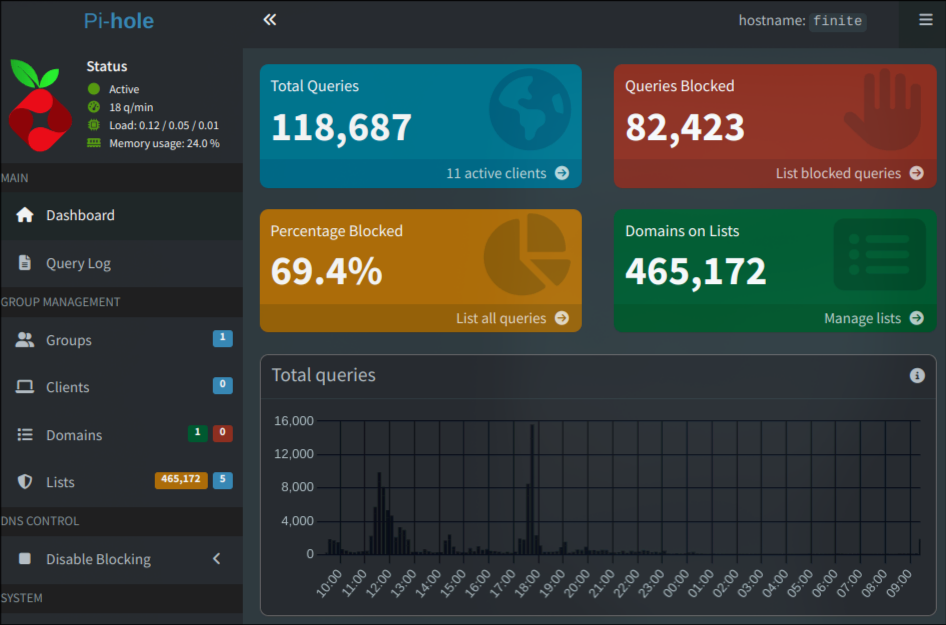 My Pi-hole dashboard - 118,687 queries, 69.4% blocked
Why NixOS Instead of Raspbian?
I was already running NixOS on my desktop. Why maintain two different mental models?
NixOS declares your entire system in config files. Change one line, rebuild, done. No mystery state. No “what did I install six months ago?” moments. If it builds, it works. If it breaks, roll back.
For a DNS server I want to run for years without babysitting, reproducibility matters more than tutorial availability.
The Stack
| Component | Version | Role |
|---|---|---|
| NixOS | 25.11 | Base OS (declarative, reproducible) |
| Pi-hole | 6.2.1 | Ad/tracker filtering |
| Unbound | 1.23.1 | DNS resolution with TLS |
| Podman | - | Container runtime for Pi-hole |
Pi-hole runs in a container with explicit resource limits (0.5 CPU, 256MB RAM) - appropriate for a Raspberry Pi’s modest hardware.
Sensible Defaults
Most Pi-hole setups log every query. That’s useful for debugging but not something I need running 24/7.
finite disables logging by default:
environment = {
  FTLCONF_dns_queryLogging = "false";
  FTLCONF_misc_privacylevel = "3";  # maximum privacy
};
Unbound follows the same philosophy:
log-queries = "no";
log-replies = "no";
You can always enable logging when debugging, but for normal operation it’s just noise.
Show Me the Code
The entire configuration lives in clean, modular files:
finite/
├── configuration.nix              # Main entry point
├── hardware-configuration.nix     # Pi bootloader setup
├── modules/
│   ├── unbound.nix               # DNS resolver config
│   ├── containers/pi-hole.nix    # Pi-hole container
│   ├── network.nix               # Static IP, routing
│   ├── firewall.nix              # Minimal open ports
│   ├── ssh.nix                   # Key-based auth only
│   └── ...
└── settings.nix                  # Your customizations
You touch one file: settings.nix. Everything else just works.
{
  USERNAME = "pihole";
  SSH_PORT = 1234;
  STATIC_IP = "192.168.50.2";
  ROUTER_IP = "192.168.50.1";
  TIMEZONE = "Europe/Lisbon";

  PRIVATE_DNS_SERVERS = [
    "185.213.155.123@853#de-fra-dns-001.mullvad.net"
  ];
}
5-Minute Quickstart
Hardware: Raspberry Pi 3B+ or newer, SD card (8GB+), ethernet cable, power supply.
Steps:
# Clone the repo
git clone https://github.com/wh1le/finite
cd finite

# Edit your settings
vim settings.nix

# Build the SD card image
make build_image

# Flash it (replace /dev/sdX with your SD card)
sudo dd if=./result/sd-image/*.img of=/dev/sdX bs=4M status=progress
Boot the Pi, SSH in, change the default password, set your Pi-hole web UI password, point your router’s DNS to the Pi’s IP. Done.
The Bootstrap Problem
Here’s a fun one: Pi-hole needs to download its blocklist on first boot. To download anything, it needs DNS. But Pi-hole is the DNS server. Classic chicken-and-egg.
finite handles this with a post-init script that temporarily points Pi-hole at Cloudflare just long enough to grab the blocklist, then switches back to local resolution:
# Temporarily use Cloudflare
podman exec -i pi-hole sh -c 'echo "nameserver 1.1.1.1" > /etc/resolv.conf'
podman exec -i pi-hole pihole -g  # download blocklist

# Switch back to local
podman exec -i pi-hole sh -c 'echo "nameserver 127.0.0.1" > /etc/resolv.conf'
Runs once, stamps a file, never runs again. I wrote a whole article about this problem if you want the full story.
Remote Updates
The Pi is weak. Building Nix derivations on it takes forever. Instead, build on your main machine and push the result:
nixos-rebuild switch --flake .#finite --target-host user@pi-ip --sudoYour laptop does the heavy lifting. The Pi just receives the finished closure.
Hardware Requirements
- Raspberry Pi 3B+ or newer (tested on 3B+, expected to work on Pi 4, Pi 5)
- 5V 3A power supply
- Ethernet cable (WiFi is disabled - DNS servers should be wired)
- SD card, 8GB minimum
What’s Next?
I’m writing a series of articles covering the technical details:
- My NixOS Journey - how I ended up on NixOS
- How DNS-Level Blocking Stops Ad Trackers - the motivation
- Why NixOS for Raspberry Pi - declarative infrastructure for Pi projects
- The DNS Bootstrap Problem - solving chicken-and-egg DNS
- Deployment Guide - step-by-step setup
Try It
The code is MIT licensed and available on GitHub:
If you run into issues or get it working on different Pi models, open an issue. Contributions welcome.